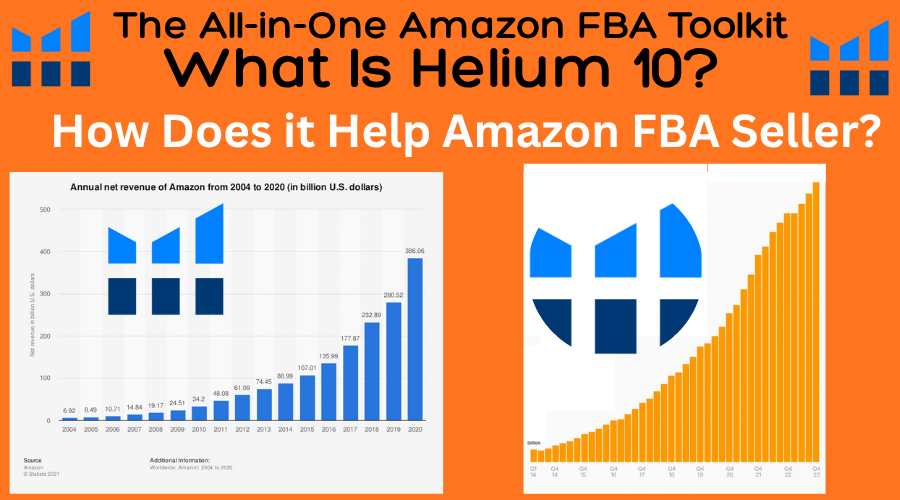
Helium 10 Tools for Amazon FBA, a clear guide to research, listings, ads, and operations. Pick winners, write clean copy, track profit, protect your brand. In this Helium 10 Reviews – Selling on Amazon feels crowded and fast. You need clear data, smart tools, and quick action. What is Helium 10? It is an all-in-one toolkit for Amazon FBA sellers that helps with research, keywords, listings, ads, and profits. In this guide, you will see what it is, a brief breakdown of the tools, and why so many sellers rely on it in 2025. Expect simple steps you can follow today, no fluff, and a clear plan to move forward.
What is Helium 10 in 2025, and how does it help Amazon FBA?
Helium 10 is software that brings product research, keyword research, listing optimization, ad tools, review requests, inventory tracking, refund help, alerts, and profit analytics into one place. It is built for new and growing FBA sellers who need better decisions in less time. Amazon is more competitive now, so data beats guesswork.
You connect your Seller Central account, research product ideas and keywords, build and improve listings, manage PPC with automation, track profits, and protect your listings with alerts. In some plans, you also get managed refund services, advanced search insights, and tools that support Walmart and TikTok Shop. The upside is simple, save time, lower risk, and grow sales.

A simple definition made for busy sellers
Helium 10 is a single dashboard that helps you find products, get seen, and make better decisions. It works across the full FBA life cycle, from idea to launch to scale.
Problems Helium 10 solves in the FBA journey
- Choosing the wrong product: Product research tools flag demand, margins, and risk.
- Weak keywords: Keyword tools surface the terms real shoppers use.
- Low visibility: Listing optimization and rank tracking guide on-page SEO.
- Wasted ad spend: PPC tools mine search terms and pause waste.
- Stockouts: Inventory forecasts and restock alerts keep you in stock.
- Missed refunds: Reimbursement detection and managed services recover lost units.
- Hijacker issues: Listing change alerts and buy box monitoring warn you fast.
Why all-in-one beats a stack of single tools
One dashboard means connected data, fewer logins, and faster training. You move from research to listing to PPC without retyping everything. Tutorials, a support community, and frequent updates help you keep pace as Amazon policies and algorithms shift. You spend less time juggling apps, and more time growing.

Plans and learning curve, in plain terms
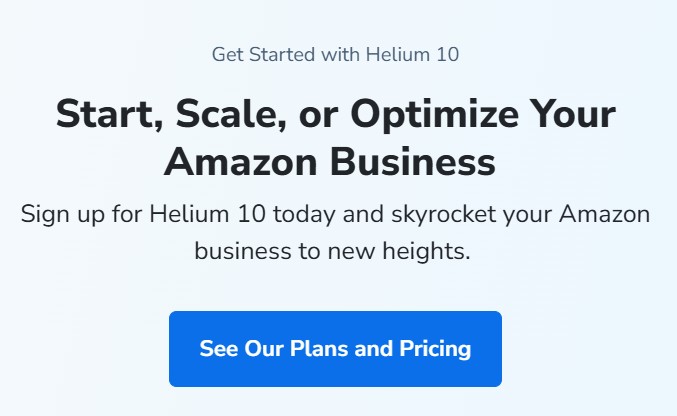
There is a free tier to test the basics. Paid plans unlock deeper data, automation, and managed services. The learning curve is manageable with videos and templates. Most sellers see quick wins in 30 days, like better keywords, cleaner titles, and early PPC savings.
Helium 10 tools, a brief breakdown by job
Below is a fast way to think about the suite, grouped by the job to be done.
Product research tools: find demand and low-risk ideas
You discover niches, size up demand, and judge competition strength. You check trends and seasonality so you are not caught by a spike that fades. Watch for monthly sales ranges, price bands, review depth, and trend lines. Tip, avoid fads, chase steady demand you can supply.
Keyword research tools: target words shoppers actually use
You see search volume, relevancy, competing products, and long-tail terms that convert. Build a master keyword list for titles, bullets, backend fields, and PPC. Keep it tight at first. Tip, favor high relevance over raw volume so you rank faster and waste less.
Listing optimization tools: build, check, and improve
Use a listing builder, index checks, and a content score to guide copy and images. Indexing means Amazon can find your listing for a keyword. Image checks and competitor gap analysis show what to fix first. Add your top keywords to the title, the first bullet, and A+ content for a fast lift.
PPC and analytics tools: spend smarter, scale faster
Automation and rules can mine winning search terms, pause poor spend, and boost top keywords. Track ACOS, ROAS, TACOS, and keyword rank. Let data show where to push or pull back. Tip, start with tight exact match, then expand as you learn.
Operations tools: inventory, refunds, reviews, and alerts
Stock forecasts, restock reminders, and aging inventory signals protect your buy box and cash flow. Refund detection catches lost or damaged units. Review requests run on schedule, and sentiment alerts flag product issues early. Listing change and hijacker alerts protect your brand and pricing.
From idea to launch: How to use Helium 10 step by step
You can run this simple path in a weekend. Keep it practical and linear.
Research day: Spot a product, check demand, avoid traps
Scan a few categories you understand. Shortlist ideas with steady demand, sane competition, and clear use cases. Check margins, size, and FBA fees. Validate with search volume and review depth. Kill ideas that fail profit math or show sharp seasonal spikes without off-season sales.
Success looks like three ideas with steady demand, room for improvement, and a clean supply plan.
Build the listing: Map keywords and write for humans
Create a keyword map by intent, primary and secondary terms, long-tail phrases, backend keywords. Write a clear title, focused bullets, and a benefit-led description. Add images that show size, use, and the one thing that makes your offer better. Run an index check and fill gaps before launch.
Success looks like strong indexing on core terms, a clean image set, and a content score you are proud to publish.

Launch and rank: Start lean PPC, track rank daily
Set up small daily budgets on exact and phrase match for your top terms. Watch keyword rank, clicks, and early conversions. Add negative keywords to cut waste. Use a small coupon or discount to boost clicks and lower friction.
Success looks like rank climbing on target keywords, lower ACOS on a few terms, and early sales that build reviews.
Improve week by week: Reviews, stock, and profit checks
Turn on review requests. Watch star rating and customer themes. Keep a restock plan with lead times and safety stock. Review profits and TACOS weekly. Make one change at a time, so you can see what worked.
Success looks like steady reviews, stable rank, and a profit trend that moves up, not just revenue.
Why do so many FBA sellers use Helium 10? Cost, ROI, and fit
Helium 10 saves time, cuts guesswork, raises visibility, and protects profit. In 2025, it also adds AI-powered PPC automation in mainstream plans, managed refund services that take work off your plate, and advanced search insights on higher tiers. That means faster tests, faster learning, and fewer leaks in your funnel.
Time saved, mistakes avoided, sales gained
- Automated review requests, PPC rules, and restock alerts remove repeat work.
- Better keywords and cleaner listings pull in more sessions and boost conversion.
- Fewer stockouts and faster reimbursements protect margin you already earned.
Who it fits, and who might skip it
Best fit, private label and brand owners who need research through PPC in one place. Helpful for wholesale sellers who manage many SKUs and need inventory and ad control. If you sell a few used books or do small retail flips, a full suite may be too much. Try a free tier first if you are not sure.
Smart way to pick a plan and track ROI
Use a simple frame. Estimate hours saved each week and multiply by your hourly value. Add extra gross profit from better rank and cleaner ads. Compare that to the monthly cost. Start on a lower plan, then upgrade when you need automation, managed refunds, or deeper data.
If not Helium 10, what else should you consider?
There are focused tools for product research, keyword data, or PPC only. The tradeoff is lower cost, but data is scattered and setup takes longer. If you want one login and connected data, Helium 10 tends to win. If you want to mix and match, the list below helps.
Helium 10 Tools for Amazon FBA: The Features That Actually Move the Needle
Growing an FBA brand feels like juggling knives. Product ideas, keyword research, listings, ads, and stock, all at once. The good news, Helium 10 Tools cover the entire path, from the first search to repeat sales. No fluff, just tools that help you pick winners, write clear listings, control ads, and protect your work.
Here is the plan. You will see the suite split into four buckets: research, listing and conversion, ads and analytics, and operations and protection. Each section shows what the tool does, what problem it solves, and simple steps to use it.
Quick example to make this real: use Xray to check demand on Amazon, pull keywords with Magnet, write the listing in Listing Builder, then run and tune ads with Adtomic. As you read, keep notes on the tools that fit your stage.

Product and keyword research in Helium 10 Tools: find profitable ideas fast
Great research reduces risk. Your goal is simple. Choose a product with steady demand, fair competition, and clear keyword opportunities. Then turn that into a clean plan.
These tools help you decide fast, without guessing.
Black Box and Trendster: spot steady demand and avoid bad seasons
Black Box is a product finder. It lets you filter Amazon’s catalog by the data that matters: price, sales, revenue, reviews, weight, size, and category. You set targets, it returns ideas.
Two simple use cases:
- Low review count, strong sales: filter for products with fewer than 200 reviews, over 300 monthly sales, and a price between 20 and 50 dollars. You want proof of demand with room to enter.
- Mid price, stable rank: look for a price between 25 and 40 dollars, steady sales rank, and fewer brand names. These often have loyal buyers without brutal ad costs.
Add weight and size filters to avoid surprise fulfillment fees. Small and light keeps margins happier.
Trendster checks seasonality. Paste an ASIN or keyword and read the chart. Look for smooth waves, not cliffs. If sales spike only in December, plan cash and ads around that. If the chart is flat and healthy, you have a year-round product.
Save promising results to a list. Do not lose good ideas while you browse.
A quick table for starting filters:
| Filter | Good Starting Range | Why It Helps |
|---|---|---|
| Price | 20 to 50 dollars | Enough margin, broad buyer pool |
| Reviews | Under 200 | Easier entry, room to rank |
| Monthly Sales | Over 300 | Proof of demand |
| Weight | Under 2 lb | Lower FBA fees |
| Category | One or two to start | Cleaner research, fewer rabbit holes |
Pro tip: run the same filters in three related categories. You will see patterns and better ideas.
Magnet and Cerebro: build a keyword list buyers actually use
Magnet starts with a seed keyword. Type a root term, like silicone baby spoon, and it returns related phrases with metrics. Watch search volume and relevancy. Grab long tail phrases with clear intent, such as baby spoon BPA free or soft tip baby spoon. These convert well and cost less in ads.
Cerebro starts from an ASIN. Paste a competitor ASIN and find the phrases they rank for. Sort by search volume, position, and rank movement. This reveals the keywords that bring traffic right now.
Use both to build a full list. Magnet shows the space, Cerebro shows who owns it.
Add Misspellinator for simple wins. Some shoppers mistype, and Amazon still matches. Capture those easy clicks if they fit your product.
Store everything in Keyword Manager. Tag keywords by use: title, bullets, backend, and ads. This saves time later when you write and launch.

A quick capture plan:
- Pull 80 to 120 phrases from Magnet.
- Cross-check with 5 competitor ASINs in Cerebro.
- Keep terms with clear buying intent.
- Tag by placement and importance.
Chrome Extension with Xray and Profitability Calculator: validate right on Amazon pages
Open Amazon, search your main keyword, and run Xray from the Helium 10 Chrome Extension. You will see estimated sales, revenue, BSR, review counts, and price trends, all at a glance. Scan the grid, spot listings with strong sales and low reviews, and note how many sellers rely on coupons or heavy discounts.
Click Profitability Calculator on a product page to estimate FBA fees, storage costs, and margins. Plug in your cost of goods. Check net profit at different prices. A few cents on fees or size can change everything.
Use ASIN Grabber to export targets for ads or deeper research. Add Supplier Finder to find factories fast, then request samples for top picks.
One final check: run Xray over at least three days at different times. This smooths spikes from promos or stockouts.
Keyword Tracker and Index Checker: confirm rank and indexing before launch
Publishing a listing is not the end. You need to confirm that Amazon indexes your target phrases and that your rank moves in the right direction.
Keyword Tracker shows rank over time. Add your main terms and watch lines move after you update a title or push ads. Group by match type and intent so you can keep things tidy.
Index Checker confirms whether your listing is searchable for a phrase. If you are not indexed, shoppers cannot find you. Fix the copy, backend fields, or variation setup, then check again.
Simple workflow:
- Publish the listing.
- Run an index check on top 25 terms.
- Start a small PPC test with broad match and a few exact targets.
- Watch Keyword Tracker for a week and adjust.
Listing and conversion tools in Helium 10: write listings that rank and sell
A fancy keyword set means nothing if buyers do not trust your page. Keep copy simple, clear, and benefit focused. Avoid claims that trigger policy issues. Use Helium 10 Tools to guide placement, fix gaps, and keep pace with top sellers.
Frankenstein and Listing Builder (Scribbles): turn messy keywords into clean copy
Frankenstein cleans your keyword list. It removes duplicates, symbols, and waste. You go from a messy dump to a tidy set you can use.
Open Listing Builder, then place terms in the title, bullets, description, A+ fields, and backend. The tool highlights what you have used and what you have not. This keeps you on track, without stuffing.
Remember character limits. Lead with the core benefit and main keyword in the title. Add proof like size, material, or count. Keep bullets short and skimmable.
Tips that work:
- Use the main benefit first, not features.
- Spread secondary keywords across bullets.
- Put technical specs in one bullet for clarity.
- Add lifestyle words that match real use.
Listing Analyzer and Listing Health: find gaps against top sellers
Listing Analyzer compares your page to top players. It reviews images, price, ratings, and core keywords. It will show what you are missing and where you can win.
Look for missing high intent phrases. If your rivals use toddler safe spoon set and you do not, fix it. Check your main image against theirs for click appeal. Watch your price band and rating trend.
Make a quick fix list:
- Add two high intent keywords to title or bullets.
- Upgrade the main image with better angle or scale.
- Tighten the title, remove fluff, add proof.
Track the Listing Health score over time. Small gains compound.
Review Insights and Audience: use shopper words and test ideas before you go live
Review Insights mines competitor reviews for common phrases. Pull pain points and praise, then reword them in your bullets and images. Buyers trust their own language, not buzzwords.
Audience is an add-on for rapid polls. Test image A vs. image B. Test two titles or bonus bundle ideas. Aim for clear questions. Ask which image better shows size, or which title makes the benefit obvious.
Simple test plan:
- Run two image concepts with Audience.
- Pick the winner with a clear margin.
- Update your listing and watch click rates.
Portals and QR codes: capture traffic and help buyers after the sale
Portals create simple landing pages for promos, bundles, or guides. Send ad clicks to a Portal during launch week. Share a short buying guide, then direct users to the Amazon listing. Keep it clean and fast.
QR codes help after the sale. Add a code on inserts that takes buyers to setup guides, recipes, or warranty pages. Stay policy safe. Make it helpful, not pushy.
One launch flow:
- Ad click to a Portal with a one-page guide.
- Button sends the shopper to the Amazon offer.
- Insert QR code links to a quick start PDF.
PPC and analytics in Helium 10 Tools: smarter ads, clear profits
Ads do not need to be a black box. Keep a steady routine. Cut wasted spend, move winning terms to exact, and track profit daily. You can manage this in about an hour per day.
Adtomic PPC manager: automate bids and harvest winning targets
Adtomic gives you rule-based bidding and smart structure. Set rules to lower bids on bad search terms and raise bids where you convert. Move good terms from auto to manual campaigns, then from phrase to exact as they prove themselves.
Use negations to stop spending on junk queries. Add dayparting to reduce spend during low converting hours. Control budgets by campaign so you do not overspend on tests.
Weekly routine:
- Launch new keyword tests with small budgets.
- Harvest winners into exact match.
- Cut spend on poor terms with negations and lower bids.
- Check placement performance and adjust top-of-search if it pays.
Profits dashboard: see revenue, fees, refunds, and ad costs in one place
Profits pulls in your sales, FBA fees, ad spend, coupons, and refunds. Set your cost of goods in the tool, then watch daily net profit and 7-day trends. This view keeps you honest. Growth without profit does not help.
Use alerts for spikes in returns or fee changes. A rising return rate can hint at a product issue or a listing mismatch. Fix that fast to save ad dollars.
Market Tracker: watch your niche and spot new competitors
Define your market with keywords and ASINs. Market Tracker will monitor share, price shifts, and review growth. Add the top 10 ASINs, plus two up-and-comers that look hungry.
When a new seller enters with strong images or a sharper title, study them. Update your own visuals or phrasing before they soak up more clicks.
Action step:
- Review your market weekly.
- Update main image tests if click rate dips.
- Note price changes and plan coupons with care.
Keyword Tracker trends: measure visibility from organic and ads
Track rank for your main keywords and watch movement after listing edits and PPC pushes. Turn on alerts for sudden drops. If a keyword stalls, check three items: indexing status, bid level, and click rate on your main image.
Link this with Adtomic. If rank climbs, maintain bids. If it falls, review copy, image tests, and reviews.
Operations and protection in Helium 10: stay in stock and keep your listing safe
Cash flow dies when stockouts hit or your page gets changed without warning. Set simple routines. Check inventory, claims, and alerts. Keep your brand protected, even when you are busy.
Inventory Management and forecasts: plan reorders with calm
Forecasts use sales velocity, lead time, and buffer days to plan reorders. Set supplier details and create purchase orders in the tool. Reorder at a target day count, not at zero. This gap acts like insurance.
Key inputs:
- Average daily sales for the last 30 to 60 days.
- Production time and shipping time.
- Safety stock for delays.
Check the forecast weekly. Adjust if a promo or ranking change increases demand.
Refund Genie: find FBA reimbursements you may be owed
Amazon is large, and mistakes happen. Refund Genie helps you find lost or damaged units that may qualify for a reimbursement. Export claim info and keep neat records. Run this monthly so money does not slip away. Final outcomes depend on Amazon review, but lost money recovered is real margin.
Alerts: watch for hijackers, price changes, and listing edits
Turn on alerts for buy box loss, image swaps, title changes, suppressed listings, and price moves. Use email or mobile alerts so you can act fast.
If you get hijacked, document the issue. Take screenshots, check inventory location, and compare product details. Contact support with proof and update your alerts as you go.
Follow-Up email automation: ask for reviews the right way
Use Amazon-safe messages or the built-in Request a Review feature. Set rules by ASIN and order status. Skip buyers with refunds to avoid poor experiences. Keep messages short and helpful, not salesy.
Track review rate and adjust timing. A clean, on-time request beats a long message.
Take Away
You just saw how the suite fits together in four buckets: research, listing and conversion, ads and analytics, and operations and protection. Each group solves a piece of the FBA puzzle.
Sample stacks by goal:
- Research stack: Chrome Extension Xray, Black Box, Magnet.
- Launch stack: Cerebro, Frankenstein, Listing Builder, Index Checker.
- Growth stack: Adtomic, Keyword Tracker, Profits, Market Tracker.
- Protect stack: Alerts, Inventory Management, Refund Genie, Follow-Up.
Pick one product and run a simple workflow this week. Track results in Profits, then update your keyword sets in Keyword Manager. Keep it steady and focused. The right mix of Helium 10 Tools can speed your progress and cut your costs at the same time. Start with one step today and build confidence as the data starts to work for you.
Top 10 Helium 10 Alternatives and Competitors
| Alternative | Key Features and Focus | Best For |
|---|---|---|
| Jungle Scout | Product research, sales estimates, keyword tools, listing help | Private label product discovery |
| Viral Launch | Product discovery, keyword research, market intel, PPC tools | Fast product testing and growth |
| SellerApp | Product and keyword research, PPC automation, competitor tracking | All-in-one on a budget |
| AMZScout | Product database, sales estimates, Chrome extension, tracking | Beginners testing ideas |
| Sellics | SEO, PPC, review monitoring, inventory management | Medium to large catalogs |
| ZonGuru | Product research, business metrics, customer insights | Growth-focused brand owners |
| Teikametrics | AI ad optimization, bid automation, multi-channel ads | PPC-first brands at scale |
| Perpetua | Ad automation, creative testing, retail media dashboards | Advanced PPC and analytics |
| Keepa | Price and rank history, buy box and stock tracking | Resellers and price analysis |
| MerchantWords | Keyword database, search volume trends, keyword suggestions | Keyword depth and content mapping |
Helium 10 in 2025: updates that matter to sellers
Several updates in 2025 make the suite more helpful. AI-powered PPC automation is available starting on mainstream plans, which shortens the time to tune ads. Managed refund services are included on higher plans, so reimbursements get handled while you focus on sales. Xray includes an influencer mode for those testing affiliate content. Diamond plan users get a Search Query Performance overlay that pairs Amazon search data with listing insights. There is also support for Walmart and TikTok Shop, helpful if you want to branch out without switching platforms.
These changes point to one theme, less guesswork, more connected data, and better automation.
A quick checklist for clean execution
- Product shortlisting: demand is steady, competition is beatable, margin covers ads and fees.
- Keyword map: primary, secondary, long-tail, backend fields ready before writing copy.
- Listing build: title and first bullet carry top terms, images show size and use, A+ highlights benefits.
- PPC start: exact and phrase match for top terms, small daily budgets, negatives added fast.
- Ops guardrails: restock reminders on, refund checks running, listing alerts active.
- Weekly review: rank movement, ACOS and TACOS trend, star rating and themes, profit not just revenue.
Common pitfalls to avoid
- Chasing volume over relevance. You spend more and rank slower.
- Ignoring backend keywords. You leave low-hanging terms on the table.
- Thin images. Shoppers skip what they cannot understand in two seconds.
- Broad match too early. You pay to learn what you could have checked with exact and phrase.
- Launching without a restock plan. Rank gains vanish when you run out.
Simple metrics that show you are on track
- Index status on top 25 keywords
- Rank trend for 10 primary terms
- Sessions and unit session percentage
- ACOS for top 5 ad groups, plus TACOS
- Refunds recovered and stockout days avoided
When to scale and when to hold
Scale when rank is rising, ACOS is stable, and reviews are trending up. Add budget to proven terms and expand with close variants. Hold when profit dips for two weeks, star rating drops, or you see rising returns. Fix the core issue first, product fit, images, or price, before pushing harder.
How to Find Winning Products Using Helium 10 (Step-by-Step Playbook)
Picking products that sell, not just look good, is the game. Here is a clear plan for How to find winning products using Helium 10, built for speed and sanity. Black Box finds product ideas, Xray checks sales, Cerebro maps keywords, Trendster checks seasonality, Review Insights reveals complaints, and Scribbles helps write your listing. You will get clear criteria, fast research steps, firm validation, and a simple launch plan. Friendly, direct, and built to help you act today.
What makes a winning Amazon product in 2025? Use data, not guesses
Winning products hit simple, measurable targets. Aim for a price between $25 and $90, at least 300 monthly sales, under 500 reviews, and a 25 percent profit margin or higher. These numbers help filter noise and keep you in markets with demand, room to rank, and room to profit.
Small, simple, and light items reduce risk. Less to break, fewer supplier issues, lower freight, and fewer returns. Stick with items that do one job well. Skip the gimmicks.
Watch for red flags. Patents and trademarks can crush a launch. Hazmat or fragile goods raise costs and risk. Oversized items drain profit. Heavy brand loyalty means slow adoption. Seasonal spikes without year round demand lead to dead inventory.
Solve a clear pain point and you reduce price pressure. Customers pay for fixes. Think better handles, stronger buckles, more sizes, faster setup, or smarter storage.
Keep this checklist near your keyboard:
- Price $25 to $90, 300+ monthly sales, under 500 reviews
- 25 percent margin after all fees and ads
- Under 3 pounds, fits in a shoe box, simple function
- No patents or hazmat, not fragile or oversized
- Year round demand with a clear customer pain point
Clear criteria you can measure before you search
Set targets before you open any tool:
- Price: $25 to $90
- Monthly sales: 300 or more
- Reviews: under 500, average rating at least 4.0
- Profit margin: 25 percent after all fees and ads
- Weight: under 3 pounds
- Size: fits in a shoe box or smaller
Examples that often fit these ranges:
- Silicone kitchen tools, like spatula sets with heat resistance
- Pet accessories, like adjustable harnesses with better clips
Red flags that kill profits early
- Legal risk, patents or trademarks, lawsuits and takedowns
- High return rates, quality or fit issues you cannot fix
- Complex variations, SKU bloat and ad waste
- Glass or battery items, testing, certification, and fragile shipping
- Seasonal demand, dead months and cash tied up
Find fixable problems shoppers complain about
Common complaints are roadmaps. Weak zippers, poor stitching, confusing setup, lack of sizes, slippery grips, or flimsy parts. These pain points guide product changes and keywords. Build features that fix the top issues and name them in your bullets.
Use Helium 10 Black Box to uncover product ideas fast
Black Box filters millions of products in seconds. Start with tight filters that match your targets. Fewer inputs, cleaner output. This keeps you focused on product ideas that already fit your budget and goals. As you search, save and tag the best ideas. Review with fresh eyes later.
Set smart filters that match your budget and goals
Enter filters that reflect your criteria:
- Price: $25 to $90
- Sales: 300 or more per month
- Reviews: under 500
- Revenue: set a floor that fits your goals, for example $8,000+ per month
- Weight: under 3 pounds
Add risk filters:
- Seller type: prefer FBA or AMZ off for less head-to-head with Amazon Retail
- Variation count: low variation count to avoid complex listings
Add category and keyword filters to sharpen results
Pick two to three categories you know. Knowledge helps you spot junk fast. Use include and exclude keywords to clean results.
Example filter combo:
- Categories: Kitchen & Dining, Pet Supplies
- Include: silicone, adjustable, organizer
- Exclude: brand names, battery, glass, kit refills
Save, tag, and compare ideas in a clean shortlist
Bookmark or export your results. Tag each idea with margin notes, size and weight, and supplier hints. Trim to 5 to 10 strong picks before deeper checks. This avoids rabbit holes and keeps your research tight.
Validate demand and competition with Xray, Cerebro, and Trendster
Now confirm the niche. Scan page one with Xray, map keywords with Cerebro, check seasonality with Trendster, then pull complaints with Review Insights. You want steady demand, fair competition, and a clear angle you can defend.
Xray the niche to see sales and revenue spread
Run Xray on page one results for your main keyword. Look for healthy total revenue and sales spread across several sellers. If one brand owns most sales, move on. Note average review counts, price stability, and the presence of Amazon Retail. A fair niche has multiple sellers, similar prices, and manageable reviews.
Reverse ASIN with Cerebro to find high intent keywords
Pick 3 to 5 top ASINs that match your product idea. Run them in Cerebro. Pull keywords with solid search volume, mid to low competition, and strong buyer intent. Save a core keyword set for your title, bullets, and PPC. Focus on phrases that reflect pain points you plan to fix.
Spot seasonality and fads with Trendster before you buy
Paste key ASINs or keywords into Trendster. Review 12 to 24 month curves. Prefer steady or rising lines with gentle dips. Avoid sharp peaks without a baseline. If needed, cross check with Google Trends to confirm year round demand.
Mine Review Insights to find gaps you can fill
Open Review Insights for the top ASINs. Filter by 1 to 3 star reviews and scan common phrases. Turn two or three frequent complaints into clear improvements or bundles. Example: add a stronger buckle, include a size extender, or offer a heat resistant sleeve.
Build your plan to profit: margins, listing, and launch steps
Ideas do not pay bills until the math works, the listing converts, and the launch moves units. Confirm profit with real numbers, write a sharp listing, and run a simple launch plan. Track keywords and sales from day one and adjust fast.
Confirm landed cost, fees, and a 25 percent profit target
Add up every cost:
- Unit cost, shipping, duty, prep, packaging
- FBA fees and referral fees
- Inbound freight, labels, and storage
- Ad spend, both launch and steady state
Sample math line:
- Sell price $34.99, total cost and fees $25.50, profit $9.49, margin 27 percent If your margin drops below 25 percent after ads, cut the idea.
Write a keyword rich title and bullets with Scribbles
Load your keyword list into Scribbles. Place your main phrase in the title, front loaded. Add three to five key features in bullets, focused on benefits, not fluff. Use phrases that fix complaints you found, like stronger stitching, true-to-size fit, or non-slip grip. Keep sentences short and clear.

Launch with smart pricing, coupons, and starter PPC
Set a competitive price that still covers costs. Add a small coupon to lift click through. Run an auto campaign and a few exact match ads on your top keywords. Watch spend daily in week one. Pause poor terms, push winners, and keep bids tight.
Common pitfalls to avoid when picking and launching
- Chasing trendy items, they fade; pick steady demand
- Ignoring fees, your margin vanishes; model costs early
- Skipping keyword research, you miss traffic; build a core set
- Copying listings, you blend in; lead with unique benefits
- Overordering inventory, cash gets stuck; test small first
Here is the simple flow to keep: set criteria, find with Black Box, validate with Xray and Cerebro, check trends, read reviews, confirm profit, then list and launch. Run one Black Box search today and save five ideas. Keep your focus on How to find winning products using Helium 10, not on hunches. Start now, tag your best picks, and move one step closer to a product that sells.
Helium 10 vs Jungle Scout: Which Is Better for Sellers in 2025?
Choosing your first Amazon tool can feel like loading a cart in the dark. Both Helium 10 and Jungle Scout are proven, but they fit different goals. This guide cuts the noise and matches features to real work: product research, keyword research, listing SEO, PPC, supplier sourcing, and marketplace coverage.
You will see where each tool shines. You will get a simple verdict by use case and a quick checklist to decide. The focus is practical and honest.
TL;DR: Jungle Scout is best for beginners and tight budgets, Helium 10 is best for scaling and advanced SEO or PPC. Prices and features are current as of October 2025 and can change.
Helium 10 vs Jungle Scout in 2025: key differences at a glance
Both tools cover product research, keywords, and listings. Helium 10 leans into advanced SEO and PPC automation. Jungle Scout makes research and supplier sourcing easier.
Helium 10 also supports Walmart integration, which is useful if you plan to expand. Jungle Scout costs less at mid and top tiers.
Use helium 10 vs jungle scout as a lens, then go deeper based on your needs.
Pricing and plans compared, free trial and refunds
Here is a quick view of typical pricing seen in 2025. Monthly rates are listed first, with common annual equivalents in parentheses.
| Platform | Starter | Middle | Top | Trial or Refunds |
|---|---|---|---|---|
| Helium 10 | $39 ($29 annual) | $99 ($79 annual) | $279 ($229 annual) | Limited free plan, 7-day free trial |
| Jungle Scout | $49 ($29 annual) | $79 ($49 annual) | $149 ($129 annual) | No free plan, 7-day money-back guarantee |
- Annual billing lowers the effective monthly cost for both.
- Pricing and plan names shift over time. Check the current pages before you buy.
Core features you will use every week
Most sellers live inside three areas: finding products, finding keywords, and improving listings. Both tools handle these well.
- Product research: Both give demand, sales estimates, and competition snapshots. This helps you avoid slow movers and spot trends early.
- Keyword research: Both suggest relevant search terms with volume and rank data. Better keywords mean more traffic and lower wasted ad spend.
- Listing optimization: Both provide guidance and audits. Clean, keyword-rich titles and bullets raise visibility and conversion.
Where Helium 10 pulls ahead:
- Advanced SEO depth: Stronger keyword tools and rank tracking for long-tail wins.
- PPC automation: Bid changes and keyword rules save hours each week.
- Walmart integration: One login, more channels. Useful for future growth.
Where Jungle Scout stands out:
- Supplier Database: See real suppliers tied to known brands, then filter by shipments and regions. Faster sourcing with less guesswork.
These features matter because they save time, protect margins, and help you scale without hiring early.
Ease of use and learning curve for beginners
Jungle Scout is simpler. It guides you from idea to supplier in a clean flow. Dashboards feel friendly, so you move faster.
Helium 10 is deeper. It can feel heavy at first with many tools and settings. The payoff is control, but it takes time.
Tip: Pick what fits your skills today, not a year from now, unless you plan to scale fast.
Market coverage and integrations
Helium 10 supports more marketplaces overall. It also includes Walmart integration. Jungle Scout focuses on Amazon and does not include Walmart support.
Why this matters: if you plan to sell in more regions or on Walmart, Helium 10 can reduce tool switching later. Your data stays in one system, which keeps reporting consistent.
When Jungle Scout is better: best fits, pros, and limits
Jungle Scout feels like a clear map for your first launch. The layout makes sense. The reports are easy to scan. You can go from idea to supplier in a single session.
Perfect for first-time sellers and tight budgets
Jungle Scout is easier to start with, and it costs less at mid and top tiers than Helium 10. Setup is quick. Guided product research helps you confirm demand without deep analysis. Dashboards keep focus on the next step. It is a strong pick for your first or second product.
Faster product discovery and supplier sourcing
Here is a simple workflow that works well:
- Validate demand using product research and sales estimates.
- Check competition and reviews to gauge difficulty.
- Open the Supplier Database to find manufacturers tied to similar products.
- Get quotes, confirm MOQs, and estimate landed costs to check margins.
This tight loop moves you from idea to samples with less back and forth.
What you trade off with Jungle Scout
You trade depth for speed. Jungle Scout has lighter SEO tools than Helium 10. There is no PPC automation. There is no Walmart integration. These gaps matter once you manage several SKUs or push harder on organic rank and ads.
Cost control and ROI tips with Jungle Scout
- Start monthly. Switch to annual once you are sure.
- Skip add-ons you will not use this quarter.
- Review ROI every three months.
Run a 30-day test plan:
- Goal 1: Validate 3 product ideas with clear demand and margin.
- Goal 2: Source 1 product with at least two supplier quotes.
- Goal 3: Draft a listing outline with target keywords and image notes.
If you hit all three, consider annual billing to save.
When Helium 10 is better: best fits, pros, and limits
Helium 10 suits sellers who want more control and broader reach. It gives fine-grained keyword data, rank tracking, PPC rules, and marketplace support beyond Amazon US.
Great for scaling brands and multi-market growth
Helium 10 supports more marketplaces and includes Walmart integration. If you plan to expand, you can keep research, listings, and ads in one place. You avoid tool switching as you add regions or channels.
Stronger keyword research and listing SEO
Helium 10 shines in keyword depth and listing optimization. Try this workflow:
- Research primary and secondary keywords with volume and intent.
- Map terms to title, bullets, backend, and images.
- Check indexing and fix any misses.
- Track rank by keyword over time, then update copy based on movement.
These steps lift organic traffic and improve ad efficiency because better relevance lowers CPC waste.
Built-in PPC automation and revenue recovery
Helium 10 includes PPC automation to adjust bids and move keywords across match types. It also offers tools that help recover refunds and reimbursements. Small wins add up. Bid rules protect spend. Refunds put cash back in your pocket. Together, they boost profit while you scale.
Downsides to plan for: price and complexity
Helium 10 costs more, especially at the top tier. The interface can feel busy. Plan your setup. Build a focused dashboard. Hide tools you do not need yet. Learn one feature at a time, such as keywords first, then PPC.
How to pick the right Helium 10 plan
- Use the middle tier if you want strong SEO with light PPC.
- Go top tier if you manage larger catalogs and heavy ads.
- Test with the free plan or 7-day free trial to confirm workflows.
- Consider annual billing after two months of steady use to save money.
Helium 10 vs Jungle Scout: simple decision checklist
This quick checklist helps you choose in under a minute.
Choose Jungle Scout if this sounds like you
- Launching your first product.
- Limited budget.
- Want quick product ideas.
- Need a built-in supplier database.
- Prefer a simpler tool and faster setup.
Choose Helium 10 if this sounds like you
- Plan to scale across marketplaces.
- Need stronger SEO and rank tracking.
- Want PPC automation and rules.
- Sell on Walmart or plan to expand there.
- Can invest time to learn advanced tools.
Smart path many sellers take
Start with Jungle Scout to find and source your first winning product. Add or switch to Helium 10 as you scale and need stronger SEO and PPC. Avoid paying for both long term unless the extra insights clearly pay for themselves.
When you compare helium 10 vs jungle scout, the choice follows your stage. Jungle Scout wins for beginners and budgets. Helium 10 wins for advanced growth, SEO, PPC, and multi-market plans. Pick one, set a 30-day test with 3 measurable goals, and review ROI before locking into annual billing. Try the free plan or trial, make your pick today, and keep your focus on profitable execution.
The bottom line on ROI
The real return is focus. You get one toolkit that covers the core loops, research, build, launch, measure, and protect. With connected data and light automation, you move faster with fewer mistakes. That is what turns a product idea into a real SKU that keeps selling.
Helium 10 Reviews (2025 Guide for Serious Amazon Sellers)
Looking for a clear, honest take on Helium 10 in 2025? You will find a straight look at pros, cons, pricing, and real use cases in this review. You will also see a quick comparison of Helium 10 vs Jungle Scout vs Viral Launch, plus a simple checklist to help you decide.
Helium 10 is an all-in-one suite for Amazon sellers, also helpful for Walmart and even TikTok Shop research. It is used by over 1 million users, and it has a strong reputation for data depth and practical tools.
Quick verdict: it is great for serious sellers who want accurate data, more control, and a full toolbox. It is not ideal if you want the cheapest or simplest option.
Helium 10 Reviews: The Short Answer
If you want the fast version, read this section, then skip to the comparison.
What Helium 10 does well:
- Strong data accuracy and depth across core tools
- Broad suite, from product research to PPC and rank tracking
- Scales with your brand, useful for teams and agencies
Where it falls short:
- Price climbs on higher tiers
- Can feel complex for new sellers
- Starter plan limits push upgrades
Who gets the most value in 2025:
- Growing Amazon brands ready to invest in PPC, keywords, and listings
- Agencies managing several accounts
- Data-minded founders who want control and repeatable growth
TL;DR: Helium 10 is best if you want deep research and control, and you are fine with a learning curve.
Who Should Use Helium 10 in 2025
Ideal users include sellers past their first product, teams that plan to scale, and agencies that manage multiple shops. Data-minded founders will like its research depth and tracking.
Common use cases:
- New product discovery and validation
- Keyword growth and reverse ASIN research
- Listing upgrades for better rankings and conversion
- PPC optimization and rank tracking
Walmart and TikTok Shop sellers can use its research and keyword insights to guide cross-channel decisions.
What Helium 10 Actually Does (in Plain Terms)
Think of Helium 10 as your operations hub. It helps you:
- Find products worth selling
- Find the keywords buyers use
- Write and improve listings
- Track keyword ranks over time
- Watch competitors and their moves
- Manage ads and trim waste
- Keep stock healthy with alerts
Popular tools to know:
- Black Box for product discovery
- Cerebro for reverse ASIN keyword research
- Frankenstein for keyword cleanup
- The Chrome Extension for quick checks while browsing Amazon
What Users Like and What Bugs Them
Pros:
- Broad toolkit in one place
- Strong data that leads to better calls
- Time savings across research, writing, and ads
- Scalable plans for teams
Cons:
- Higher cost on advanced tiers
- Learning curve due to many features
- Starter plan limits that push upgrades
- Support is ticket-based and can feel slow for some users
Helium 10 Features Rated: What Helps You Rank and Sell
Helium 10 shines when you tie features to outcomes. Use it to find low competition keywords, write indexable copy, and cut wasted ad spend. The more consistent your inputs, the more the data compounds over time.
Product Research with Black Box
Black Box helps you filter millions of products and niches. You can check sales estimates, trends, review counts, and demand signals. It is great for spotting gaps that bigger brands miss.
Beginner-friendly filter stack example:
- Price: 20 to 60 dollars
- Reviews: under 200
- Monthly sales: 300 to 1,000
- Sales trend: stable or rising over 3 to 6 months
- Category: choose 1 to 3 categories you know well
Outcome to expect: a shortlist of products with demand, fair margins, and manageable competition.
Keyword Research with Cerebro and Frankenstein
Cerebro runs reverse ASIN research. You plug in a top competitor ASIN, then see the keywords that drive their traffic. Filter by search volume, ranking position, and organic or sponsored presence.
How to spot high intent terms:
- Good search volume, not just seasonal pops
- Buyer words like best, review, top, size, pack
- Lower competing products and manageable PPC bids
Frankenstein cleans keyword lists. It merges duplicates, strips junk, and formats terms for listing copy or PPC. This saves time and reduces errors. It also helps you keep strict match types precise.
Listing Optimization: Titles, Bullets, and Indexing
Listing optimization tools help you write titles and bullets that both rank and convert. Write for humans first, bots second. Place primary keywords early, but keep it readable.
Track indexing and placement so you know if Amazon recognizes your terms. Monitor rank movement to tie edits to results.
Quick checklist for an SEO-friendly listing:
- Primary keyword in the title and first bullet
- 3 to 5 secondary keywords in bullets and description
- Clear benefits, not just features
- Real objections addressed in copy
- Mobile-friendly bullets with short phrases
- Back-end keywords filled, no repeats or brand names
- Fresh images and A+ content that match the copy
PPC Tools and Rank Tracking
Helium 10 helps you manage PPC with better data. You can find target keywords, pause waste, and scale winners. Watch bids and search terms to keep spend focused.
Rank tracking shows keyword movement over time. When you adjust bids or update copy, you can see the impact on ranking and sales. This link between actions and outcomes is where Helium 10 pays off.
Helium 10 Pricing, Pros and Cons
Prices change, so confirm on the site. Here is a plain view of cost and value.
Plans and Typical Costs in 2025
- Free plan: tight limits, good for testing the basics
- A common paid tier, often called Platinum: around 97 dollars per month
- Higher tiers: more users, more limits lifted, advanced tools
- Annual billing can lower the monthly rate
If you want advanced PPC, more tracking, and multi-user access, expect to pay more. Always check current pricing and promos.
Pros That Save Time and Money
- Accurate data for better product picks
- Faster keyword research with reverse ASIN and cleanup tools
- Cleaner listings that rank and convert
- Ad spend trimmed with smarter targeting
- One suite covers many jobs, so fewer logins and smoother workflow
Cons and Limits You Should Know
- Higher tiers can be expensive
- The toolset can feel heavy at first
- Starter plan limits push upgrades as you grow
How to reduce the pain:
- Start with 3 core tools, like Black Box, Cerebro, and a rank tracker
- Build one weekly habit, like a 30-minute keyword sprint
- Set PPC rules for pausing waste, then review once a week
Best For and Who Should Skip
Best for:
- Brands ready to scale
- Agencies and teams
- Data-driven sellers who want control
You may skip or delay if:
- You are a hobby seller
- Your budget is under 60 dollars per month
- You prefer a simple app with fewer steps
Helium 10 vs Jungle Scout vs Viral Launch: Clear Comparison
This is often the most searched part of Helium 10 Reviews and Helium 10 Alternatives. Here is the short, helpful version.
Helium 10 vs Jungle Scout
Helium 10 offers more advanced tools and strong data. It often gives deeper insights, but it costs more and takes longer to learn.
Jungle Scout is simpler and cheaper. It is a solid pick for beginners and solo sellers who want quick wins.
Pick Helium 10 if you want depth, control, and long-term tracking. Pick Jungle Scout if you value ease and lower cost.
Helium 10 vs Viral Launch
Helium 10 is the better all-in-one choice for most sellers. It covers research, keywords, listings, PPC, and tracking in one place.
Viral Launch is solid for product launches and can be cheaper. It has fewer all-around tools, but it can work if your main goal is launching on a budget.
Data Accuracy, Learning Curve, and Value
- Data quality: Helium 10 is strong and trusted for research and tracking
- Learning curve: Helium 10 is steeper, Jungle Scout is easier, Viral Launch sits in between
- Value per dollar: Beginners may get better value from Jungle Scout or Viral Launch, while growth-focused brands often get more value from Helium 10 over time
Better data reduces risky bets. If you avoid one bad product pick, the tool can pay for itself.
Quick Decision Checklist
Answer yes or no:
- Do you need deep keyword data and reverse ASIN research?
- Are you managing PPC or plan to scale ads?
- Do you track ranks and tie actions to results?
- Will you sell on Walmart too, or plan multi-channel use?
- Is your budget above 90 dollars per month?
- Do you prefer power and control over simplicity?
- Are you past your first product and ready to grow?
- Do you work in a team or manage multiple accounts?
If most answers are yes, pick Helium 10. and if you want lower cost and simple workflows, pick Jungle Scout. If launches are your main focus, pick Viral Launch.
Simple Comparison Table
| Tool | Best For | Strengths | Watchouts |
|---|---|---|---|
| Helium 10 | Growth-focused brands, teams | Data depth, full suite, PPC support | Higher price, learning |
| Jungle Scout | Beginners, solo sellers | Ease of use, lower cost | Fewer advanced tools |
| Viral Launch | Budget launches | Launch tools, fair pricing | Narrower toolset |
Helium 10 is a powerful suite with accurate data. It is best for sellers who want depth and are ready to learn it. Choose Helium 10 for growth and control. Pick Jungle Scout for lower cost and ease. Pick Viral Launch if you focus on launches.
Next step: start a trial, test Black Box for product ideas, run a Cerebro keyword check, then track rank movement for one week. See what the data tells you, then commit to the tool that fits your plan.
Conclusion
Helium 10 brings the full FBA toolkit into one place, which helps you find products, get seen, and protect profit. The suite covers research, keywords, listings, ads, operations, and refunds in one view, so you act with confidence.
Results come from steady action and simple tracking. Pick one product idea this week, map your keywords, and test a lean launch. Keep the loop tight, measure what matters, and adjust. If you came here asking What is Helium 10, the answer is simple, it is the fastest path to data you can trust and steps you can take today.
“Disclaimer: This page contains affiliate links. I may earn a commission at no extra cost to you if you sign up through my link.”